1 / 8 · Click to enlarge
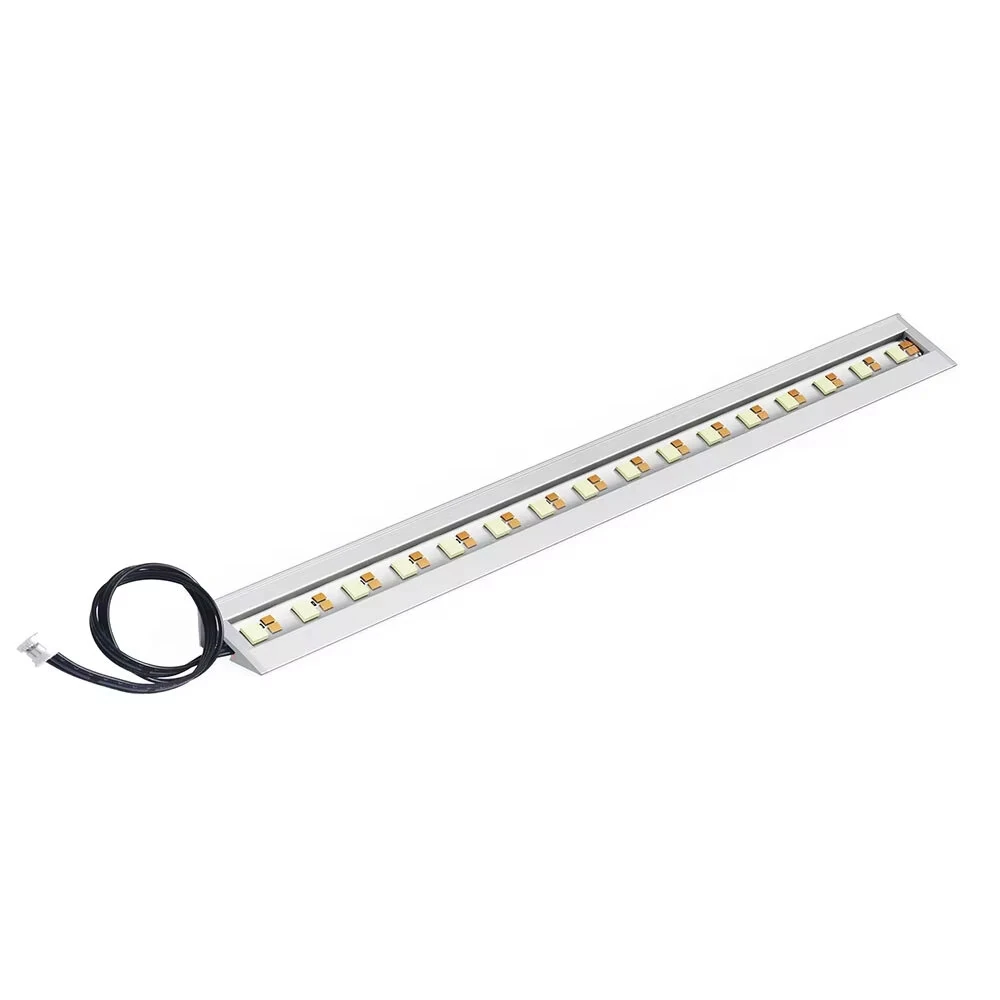
BIQU Panda LUX RGB PX Light Bar Kit Magnetic Mounting App Control H2D Style Status Indicator for Bambu Lab P1 X1
The BIQU Panda LUX RGB PX Light Bar Kit Magnetic Mounting App Control H2D Style Status Indicator for Bambu Lab P1 X1 by BIQU is a mid-range product designed for everyday users.
Available Offers
Free Delivery on this order. No minimum order value.
15-Day Easy Returns — hassle-free return & full refund.
Secure Payment — 100% safe checkout with UPI, Cards & Net Banking.
26% Off — you save ₹726 on this product!
Color: RGB
Available Offers
5% Cashback
Pay with UPI & get 5% cashback (up to ₹50) via Razorpay
No-Cost EMI
Available on select bank cards at checkout. 0% interest for 3 months.
Free Shipping
Free delivery on all orders. No minimum order value.
Cash on Delivery
COD available on orders up to ₹5,000 across India.
Ideal For
About This Product
The BIQU Panda LUX RGB PX Light Bar Kit Magnetic Mounting App Control H2D Style Status Indicator for Bambu Lab P1 X1 by BIQU is a mid-range designed for everyday users. It delivers reliable performance at an accessible price.
Why Buy from Pricio?
Pricio sources this product directly, cutting out multiple middlemen. Every order includes free shipping, a 15-day return policy, and secure payment via Razorpay.
Specifications:
Brand: BIQU
Model: Panda LUX RGB PX
Color Temp.: RGB+6000K White Light
Lighting Effects: Static, Breathing, Strobing, Wave, Marquee,ColorCyce,Rainbow, Warning: Hot,H2D StyleStatus
Indicator
Web UI+BIQU APP Control: Support
Original Screen & APP Control: Support
Material: Aluminum Alloy
Magnetic Mounting: SUpport
LED Quantity: 16 High Brightness RGBW LEDs
Voltage: 5V
Current: Standby 0.07A, Peak 0.71A
Waterproof: No
Product Size: 273mm
Lifespan: Up to 36,000 Hours
Printer Compatibility: - For Bambu Lab P1P,P1S: direct install and use.
-For X1C and X1E: requires a separate 2 m USB cable.
For XIC and XiE printers, it is recommended to use the Panda Branch as the power source for optimal cable routing. Otherwise, a separate 5V USB power adapter is required.
Features:
1. Intense Illumination: Experience superior clarity with a high-brightness 6000K cool white light, making it easy to see print details and identify potential issues instantly.
2. Vibrant RGB Color Effects: The RGB PX model offers millions of colors and dynamics modes like wave, rainbow, and strobing to personalize your workspace aesthetic.
3. Smart Status Indicator: Provides instant visual feedbacks on your printer's status, using specific colors to indicate printing, paused, error, and idle states (RGB PX model only).
4. Effortless Magnetic Mounting: Simply snap the light bar into place. The strong magnetic connection ensures a secure fit for a quick and simple upgrade.
5. Wireless & App Control: Take full command via a web interface or your printer's screen. Adjust brightness, colors, and effects with total convenience.
6. Plug & Play Installation: Get up and running in minutes with a straightforward setup that powers directly from the printer or a USB source, depending on the model.
Package Include:
1x Panda Lux RGB PX
1x Control Board
1x Connection Cable
2x Screws
1x Double-sided Tape