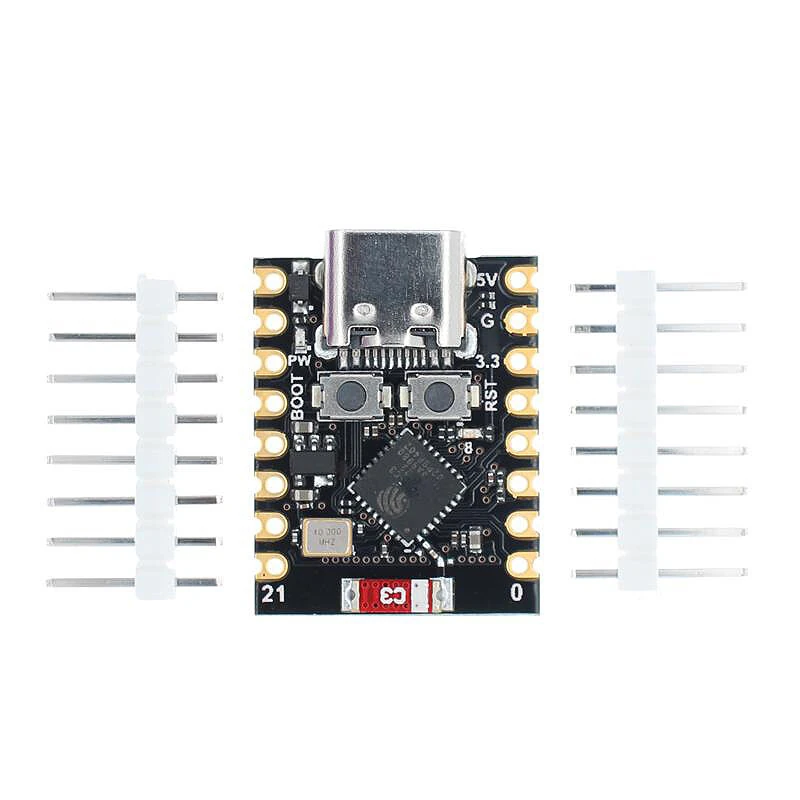
ESP32-C3 Development Board ESP32 SuperMini WiFi Bluetooth Mini Module
5.04 ratingsThe ESP32-C3 Development Board ESP32 SuperMini WiFi Bluetooth Mini Module is a value-for-money motherboard & development board designed for everyday users. Customers praise its accurate and reliable.
Available Offers
Free Delivery on this order. No minimum order value.
15-Day Easy Returns — hassle-free return & full refund.
Secure Payment — 100% safe checkout with UPI, Cards & Net Banking.
29% Off — you save ₹385 on this product!
Available Offers
5% Cashback
Pay with UPI & get 5% cashback (up to ₹50) via Razorpay
No-Cost EMI
Available on select bank cards at checkout. 0% interest for 3 months.
Free Shipping
Free delivery on all orders. No minimum order value.
Cash on Delivery
COD available on orders up to ₹5,000 across India.
Ideal For
About This Product
The ESP32-C3 Development Board ESP32 SuperMini WiFi Bluetooth Mini Module is a value-for-money motherboard & development board designed for everyday users. Customers highlight its accurate and reliable.
Why Buy from Pricio?
Pricio sources this product directly, cutting out multiple middlemen. Every order includes free shipping, a 15-day return policy, and secure payment via Razorpay.
Note:
If external power supply is required, just connect the + level of the external power supply to the position of 5V, GND connects to the negative terminal. (Support 3.3 ~ 6V power supply). Remember that when connecting the external power supply, you cannot access USB, USB and external power supply can only choose one.
Enter the download mode: Hold down the BOOT button of the ESP32C3, press the RESET button, release the RESET button, and then release the BOOT button. Then the ESP32C3 will enter the download mode. (Each connection needs to re-enter the download mode, sometimes press once, the port instability will be disconnected, you can judge by the port identification sound)
Model: ESP32-C3 SuperMini
Color: Black
Wireless connectivity: WiFi, bluetooth
Solderless design
Features:
1. Powerful Performance: The ESP32-C3 SuperMini offers high performance with its WiFi and bluetooth capabilities.
2. Solderless Design: The black board features a solderless design for easy installation and usage.
3. Reliable Connectivity: Connect seamlessly with the built-in WiFi and bluetooth options, ensuring reliable communication.
4. Compact Size: The SuperMini size allows for easy integration into any electronics project.
5. Versatile Applications: Perfect for IoT projects, home automation, and other electronics applications.
Package includes:
1x ESP32-C3 SuperMini WiFi bluetooth Development Board