1 / 8 · Click to enlarge
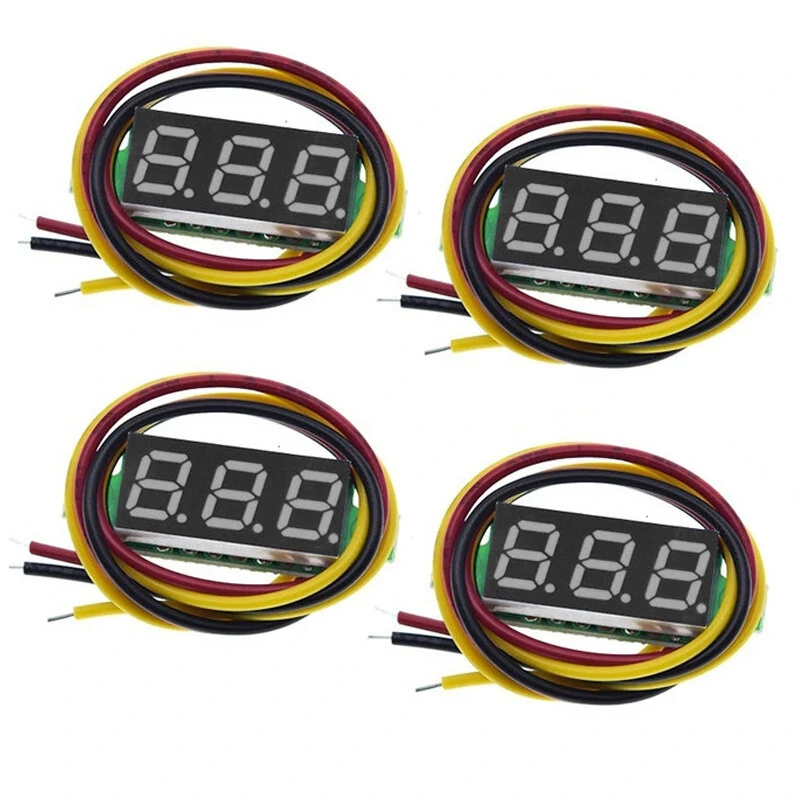
4pcs Digital Mini Digital Voltmeter 0.28Inch Three-Line 0-100V Digital Voltmeter Gauge Tester LED Display Panel Voltmeter
5.06 ratingsThe 4pcs Digital Mini Digital Voltmeter 0.28Inch Three-Line 0-100V Digital Voltmeter Gauge Tester LED Display Panel Voltmeter is a value-for-money test & measuring module designed for everyday users. Customers praise its fast and responsive and accurate and reliable. 100% of buyers rate it 4★ or above.
Available Offers
Free Delivery on this order. No minimum order value.
15-Day Easy Returns — hassle-free return & full refund.
Secure Payment — 100% safe checkout with UPI, Cards & Net Banking.
44% Off — you save ₹625 on this product!
Price: ₹785
Available Offers
5% Cashback
Pay with UPI & get 5% cashback (up to ₹50) via Razorpay
No-Cost EMI
Available on select bank cards at checkout. 0% interest for 3 months.
Free Shipping
Free delivery on all orders. No minimum order value.
Cash on Delivery
COD available on orders up to ₹5,000 across India.
Ideal For
About This Product
The 4pcs Digital Mini Digital Voltmeter 0.28Inch Three-Line 0-100V Digital Voltmeter Gauge Tester LED Display Panel Voltmeter is a value-for-money test & measuring module designed for everyday users. Customers highlight its fast and responsive and accurate and reliable.
Customer Verdict
100% of buyers rated this product 4 stars or above. The most appreciated qualities are: fast and responsive, accurate and reliable.
Why Buy from Pricio?
Pricio sources this product directly, cutting out multiple middlemen. Every order includes free shipping, a 15-day return policy, and secure payment via Razorpay.
Specifications:
Measuring range: three-wire DC 0~100V
Working voltage: 4~40V (with reverse connection protection), higher than 40V may be damaged
Test accuracy: ±1% >10V error positive and negative 0.2V <10V positive and negative 0.03V
Input impedance: 50KΩ
Working current: <30mA
Refresh rate: about 100mS once
Display specifications: three wire 0.28" LED digital tube
Lead length: default 15cm
Shape ruler: 33 x 11.5 x 9 mm
Mounting hole: 23*10 mm
Opening size: hole distance: 26mm hole diameter: 2.2mm
Working temperature: -10 ~ +65 °C
Working humidity: 10 ~ 80%
Working pressure: 80 ~ 106kPa
LED Color:Red/Blue/Green
Features:
• 2 Connection Methods:3 wires are connected separately to measure voltage and power(yellow red is both forpos, black isneg); 3 wires are used as 2 wires, connected to measure voltage and Yellow can be pair forpos, black isneg).
• Mini Voltmeters:Total 4PCS, 4 colors optional each one; 0.28 inch LED Panel; small in size and light in weight.
• Features:Reverse polarity-protection, voltmeter will not burn out if reverse-polarity is applied; high-precision; low starting working voltage; fine adjustment function.
• Good quality: This product is made of high-quality materials, exquisite workmanship, very good quality and long service life.
Package include:
4x 0.28inch Digital Mini Digital Voltmeters