Free Delivery  ·  COD Available  ·  15-Day Returns
Pricio
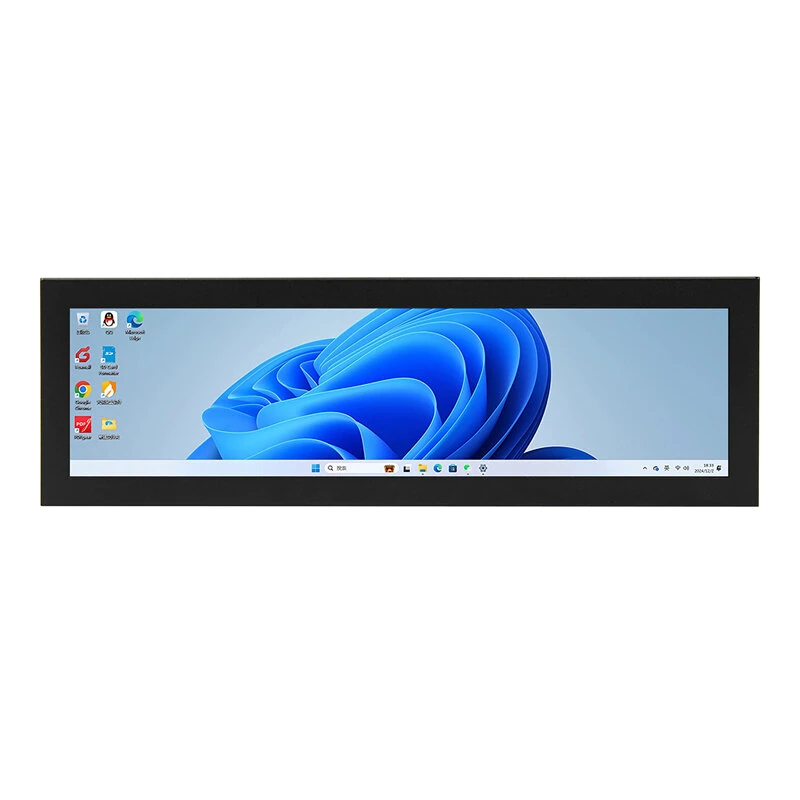
Raspberry Pi Compatible 8.8 Inch High Definition Multimedia Interface Touch Screen Display 480x1920 IPS Panel USB Type-C  Wide Viewing Angle Gaming Monitor — image 1
Hover to zoom

1 / 7 · Click to enlarge

Raspberry Pi Compatible 8.8 Inch High Definition Multimedia Interface Touch Screen Display 480x1920 IPS Panel USB Type-C Wide Viewing Angle Gaming Monitor

28+ bought in past month
AI Summary
Display Screen for gamers and content creators

The Raspberry Pi Compatible 8.8 Inch High Definition Multimedia Interface Touch Screen Display 480x1920 IPS Panel USB Type-C Wide Viewing Angle Gaming Monitor is a premium display screen designed for gamers and content creators.

₹6,739-35%
MRP:₹10,363Save ₹3,624
Free Shipping💵 COD Available

Available Offers

Free Delivery on this order. No minimum order value.

15-Day Easy Returns — hassle-free return & full refund.

Secure Payment — 100% safe checkout with UPI, Cards & Net Banking.

35% Off — you save ₹3,624 on this product!

Price: ₹6,739

Total: ₹6,739
Buying tip: A quality investment for dependable performance and premium build quality.
Estimated delivery: 17 Aug31 Aug
Free Shipping
Pan India delivery
15-Day Returns
Hassle-free policy
Secure Payment
Razorpay protected
Quality Assured
Vetted products only

Available Offers

💳

5% Cashback

Pay with UPI & get 5% cashback (up to ₹50) via Razorpay

🏦

No-Cost EMI

Available on select bank cards at checkout. 0% interest for 3 months.

📦

Free Shipping

Free delivery on all orders. No minimum order value.

💵

Cash on Delivery

COD available on orders up to ₹5,000 across India.

Ideal For

Everyday convenience
Share:
SKU: bg-2042976Category: Display Screen

About This Product

The Raspberry Pi Compatible 8.8 Inch High Definition Multimedia Interface Touch Screen Display 480x1920 IPS Panel USB Type-C Wide Viewing Angle Gaming Monitor is a premium display screen designed for gamers and content creators. It delivers reliable performance at an accessible price.

Why Buy from Pricio?

Pricio sources this product directly, cutting out multiple middlemen. Every order includes free shipping, a 15-day return policy, and secure payment via Razorpay.


Specifications:
Model: MPC8801 (with capacitive touch) / MPC8802 (no touch)
Display Size: 8.8 inches
Resolution: 480×1920 (RGB)
Active Display Area (A.A): 54.72 × 218.8 mm
Outer Dimensions: 64.3 × 231.3 × 14.6 mm
Display Panel: IPS
Viewing Angle: 360°
Touch Panel: Optional capacitive touch screen or no touch
Brightness: 580 Cd/m² (no touch) / 520 Cd/m² (with touch)
Operating Voltage: USB 5V
Interface: Type-C power input, Mini-High Definition Multimedia Interface input
Operating Temperature: -20°C to 80°C (5V @ 60% RH)
Power Consumption: 3.8W (max)
Weight: 425 g (with touch) / 375 g (no touch)

Features:
1. High Precision Resolution
The 480×1920 resolution offers a clear and detailed display, perfect for enhancing the visual experience and bringing immersive clarity for gaming, programming, or video playback.
2. Versatile Connectivity
Supports Type-C and Mini-High Definition Multimedia Interface interfaces, ensuring compatibility with Raspberry Pi, Banana Pi, BB Black PC, PS4s, Xbox 360, and various gaming consoles, offering seamless device integration.
3. Wide Compatibility
Offers multi-system support including Windows 7/8/8.1/10/11, Raspbian, Ubuntu, and many more, making it an ideal solution for both computing and gaming needs without additional drivers.
4. Optimized IPS Panel Technology
The IPS panel delivers consistent brightness, vivid color reproduction, and 360° viewing angles, making it ideal for collaborative tasks or multi-angle display demands.
5. Aluminum Alloy Design
Features an integrated metallic housing, ensuring a sleek and professional look that provides protection against everyday wear and tear while enhancing device aesthetics.

Package Included:
1 x 8.8-inch Display
1 x Micro High Definition Multimedia Interface Adapter
1 x USB to USB-C Cable
1 x Mini High Definition Multimedia Interface Cable


Product Safety Information

Setup Guide

1
Identify the pins
Locate VCC (power), GND (ground), and data pins (SDA/SCL for I2C, MOSI/MISO for SPI, or TX/RX for UART). Refer to the pinout diagram on the product page.
2
Wire to your microcontroller
Connect VCC to 3.3V or 5V (check the module spec), GND to GND, and data pins to the appropriate GPIO pins on your Arduino or Raspberry Pi.
3
Install libraries
In Arduino IDE, go to Sketch → Include Library → Manage Libraries and search for the sensor library. Install the recommended version.
4
Upload example sketch
Open File → Examples → [library name] → Basic Example. Upload to your board and open Serial Monitor to view output.
5
Calibrate if needed
Some sensors (temperature, humidity, distance) may need a short warm-up period or calibration. Run the calibration sketch if provided.