1 / 6 · Click to enlarge
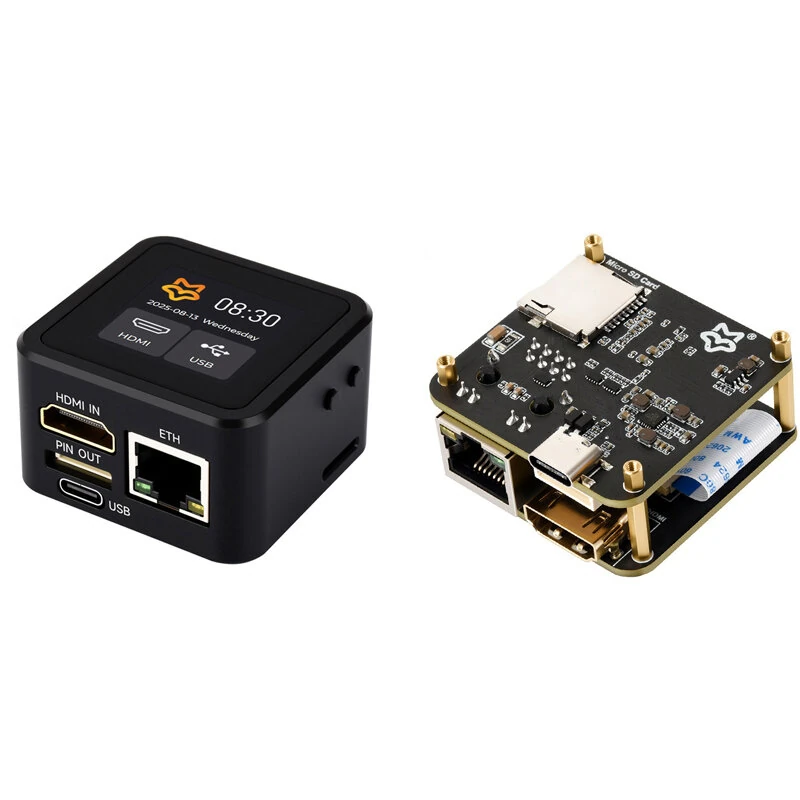
Luckfox PicoKVM Lightweight IP KVM Remote Management Tool with case and 1.54inch touch display
The Luckfox PicoKVM Lightweight IP KVM Remote Management Tool with case and 1.54inch touch display by Luckfox is a premium iot development boards designed for DIY enthusiasts and makers. It features Item Type: Remote Management Tool and Model No. / Name: Luckfox PicoKVM Base.
Available Offers
Free Delivery on this order. No minimum order value.
15-Day Easy Returns — hassle-free return & full refund.
Secure Payment — 100% safe checkout with UPI, Cards & Net Banking.
Available Offers
5% Cashback
Pay with UPI & get 5% cashback (up to ₹50) via Razorpay
No-Cost EMI
Available on select bank cards at checkout. 0% interest for 3 months.
Free Shipping
Free delivery on all orders. No minimum order value.
Cash on Delivery
COD available on orders up to ₹5,000 across India.
Quick Specs
Ideal For
About This Product
The Luckfox PicoKVM Lightweight IP KVM Remote Management Tool with case and 1.54inch touch display by Luckfox is a premium iot development boards designed for DIY enthusiasts and makers. It delivers reliable performance at an accessible price.
Key Specifications
- Item Type: Remote Management Tool
- Model No. / Name: Luckfox PicoKVM Base
- Processor Type: RV1106G3 — smooth, lag-free performance
- Storage Capacity: 8GB eMMC — plenty of room for files, apps, and media
- Core: 1 × A7@1.2G
- Memory Capacity: 256M DDR3 — effortless multitasking
- System: PicoKVM
- Resolution: 1080P@60FPS
Why Buy from Pricio?
Pricio sources this product directly, cutting out multiple middlemen. Every order includes free shipping, a 15-day return policy, and secure payment via Razorpay.
The Luckfox PicoKVM Lightweight IP KVM Remote Management Tool with case and 1.54inch touch display is a lightweight IP KVM remote management tool designed for developers, IT administrators, and makers who need simple, reliable, and affordable out-of-band system access. With support for 1080p@60fps HDMI video input and HID signal output, it enables seamless control of PCs, servers, and development boards directly through a network connection.
Users can interact with the host device as if physically present, thanks to low-latency video streaming, USB keyboard/mouse emulation, and remote system management features. Compact and efficient, the PicoKVM Basic provides stable performance for remote troubleshooting, BIOS/UEFI configuration, and device maintenance without extra software.


Features:
- Real-time 1080p at 60 fps HDMI video capture
- USB HID emulation for keyboard, mouse, and storage
- Low-latency video transmission (80–200ms)
- 100 Mbps Ethernet interface for stable connectivity
- Supports remote BIOS/UEFI access and control
- Compact size, easy to deploy in any environment
- Driver-free web access for remote management